顯示具有 IT 標籤的文章。 顯示所有文章

2023年5月14日 星期日

連線到 one drvier 時 發生問題 - 排除方法


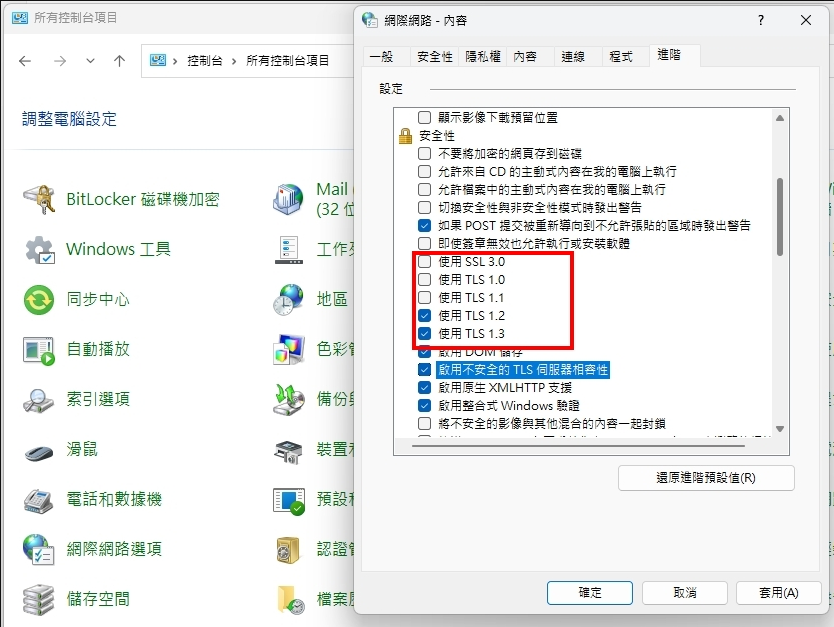
如果遇到登入One driver 發生問題

如下圖


則可以到控制台 調整下列設定,就可以排除喔


2021年7月1日 星期四

[ Skype 群組設定] 新增移除 群組成員


1. 在群組直接打上 /showmembers


2. 此時畫面會秀出 群組所有人的權限. (Admin/Master 為主持人, user為一般使用者)


3. 如果全部都是user, 那就可以先看此群組是誰創立的


4. 使用主持人或創立者帳戶,在群組直接打上

    /setrole 帳戶名字 admin 或 /setrole 帳戶名字 master

   範例 : /setrole user master


5. 此時被指定的 user 也有了主持人權限


6. 點選群組人員名單, 點選要移除的人員, 此時就會有移除的選項了


更多skype指令

在對話框打上指令 其他人員是看不到的 只有自己看的到


Skype 的啟動參數

/secondary 啟用多開模式,讓你可以同時登入好幾個 Skype 帳號

/nosplash 不顯示 Skype 啟動畫面

/removable 執行 Portable 模式

/datapath:"資料夾名稱" 指定資料檔的位置

/me [text]: 自我介紹?

/topic [text]: 變更對話主題

/add [SkypeName]: 將用戶加入聊天室

/alertson: 啟用對話通知 (預設選項)

/alertson [text]: 只出現某些字串時通知我

/alertsoff: 關閉對話通知

/leave: 離開聊天室

/setrole [SkypeName]: 將主持棒交給別人 (你必須是主持人)

/kick [SkypeName]: 從聊天室移除用戶 (你必須是主持人)

/get blob

/get uri

/get [creator|masters|helpers|users|listeners]

/golive [token]

/invite [SkypeName]

/showmembers: 顯示目前聊天室所有用戶及權限

/help: 顯示說明

/remotelogout: 登出其它裝置

/showplaces: 查詢目前的 Skype 帳號所登入的裝置

/info: 顯示目前視窗的聊天人數

2020年11月4日 星期三

桌面便利貼 由 Windows 7 移轉到 Windows 10 ( Move Sticky Notes from Windows 7 to Windows 10 )

 In Windows 7

1. Win+R => %AppData%\Microsoft\Sticky Notes

2. copy StickyNotes.snt to Windows 10 device


----------------------------------------------------------

 In Windows 10


NOTE:

You need to reset the StickyNotes in <Win Setting -> App -> StickyNotes -> Advanced setting -> Reset>


1. Win+R => %LocalAppData%\Packages\Microsoft.MicrosoftStickyNotes_8wekyb3d8bbwe\LocalState

2. Create a folder  => Legacy

3. Put the " StickyNotes.snt" into the " Legacy " folder

4. rename the "StickyNotes.snt" to "ThresholdNotes.snt"

2020年8月30日 星期日

Disable Bitlocker with Command Prompt


Hi, All


If you see the icon in your computer as following, you can try the way to turn  off the Bitlocker .


If you're an advanced user, you can turn off BitLocker by using Command Prompt.

Step 1: Open Command Prompt as administrator. 
To do that quickly press Windows Key + X to open Win + X menu and choose Command Prompt (Admin) from the menu.


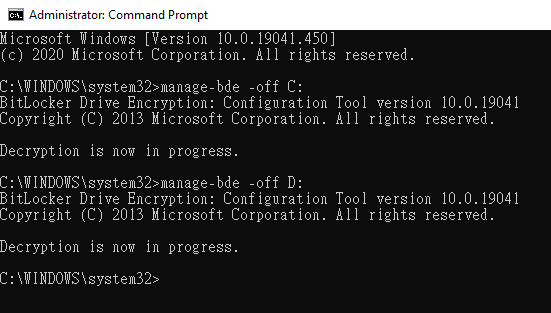
Step 2: When Command Prompt opens, enter manage-bde -off C: command and run it 

(Replace C with the drive letter of your Bitlocker drive).
For example, I want to turn off the Disk C and D.


2020年7月13日 星期一

Chrome 黑色畫面問題 黑屏 Black screen issue

如果發現Chrome 打開後,
整個瀏覽器畫面都是黑色


可能是換過顯示卡,或是GPU有變更導致

解決方法

把Chrome 的 GPU 快取清除即可

C:\Users\User\AppData\Local\Google\Chrome\User Data\ShaderCache\GPUCache

2019年12月21日 星期六

[教學] APC Smart UPS 750 不斷電系統 電瓶更換

原本的 APC Smart UPS 750 有天忽然開始逼逼叫,
查看面板,發線電瓶故障的只是燈亮起
然後面板常常一直跳出新安裝電瓶的訊息,
整個就是電瓶故障的步驟......

於是..... 在查詢了電瓶規格後,就上網購買新的電瓶來更換
準備讓UPS 續命啦!


更換步驟:

1. 拔除UPS電源


2. 開面板


3. 開面板殼,見到電瓶啦


4. 把電瓶拉出來後,會看到上面有電瓶串接用的接頭
    待會會需要拔起來


5. 來查看一下原廠電瓶規格,RBC48   12V 7.0A X 2


6. 新買的電瓶,CSB HR1234W F2 12V 34W
這個品質,依規格來看,比原廠更優

CSB 神戶電池為日本"日立"新神戶電機在台投資生產.回銷日本之高品質電池廠
其生產品質同日本"日立".新神戶電機與日本國際牌.密閉式鉛酸電池相同品質.
具有超長壽命.超高循環使用率.之特性

CSB 神戶電池-密閉式鉛酸電池-
規格: HR1234W  (12V34W) (34W/cell 15分率)
外型尺寸(mm): 長151x寬65x高94.3  總高98.6  重量:2.5Kg


7. 把新電池依據原本的聯接方式,串接上去

8. 組裝完成,安裝推回去,之後開機就大功告成啦!!


2019年12月13日 星期五

Windows 10 - BitLocker - 解除驚嘆號


1.
點左下角搜尋,輸入"cmd",
出現 "命令提示字元" 後,在上方按 "右鍵",
選擇 "以系統管理員身分執行"


2. 輸入下列  ,最後是磁碟區代號
manage-bde.exe -off D:


2019年9月6日 星期五

Windows 7 專業版 由 英文版 改 中文版


做法如下:
1.下載語言包,微軟官方語言包下載(只適用於Windows 7 SP1)


【注意】下載下來的檔案是.exe,滑鼠左鍵點兩下執行後會得到lp.cab語言包(例:將lp.cab檔copy至C:\下)

2.以系統管理員身份,開啟命令提示字元,執行以下指令安裝語言包(例:lp.cab檔位於C:\下)
dism /online /add-package /packagepath:C:\lp.cab
【注意】安裝過程需要數分鐘的時間,請耐心等待

3.在開始→執行處,輸入regedt32或registry,開啟登錄編輯程式,於左側樹狀結構依序跳轉至以下路徑
HKEY_LOCAL_MACHINE → SYSTEM → CurrentControlSet → Control → MUI → UILanguages下,只保留你需要的語言
例:由英文版轉為中文版,便要把en-US刪除,只留下zh-HK(也有可能下到的繁中語系是zh-TW)

4.以系統管理員身份,開啟命令提示字元,執行以下指令將開機選單變回繁體中文
bcdedit /set {current} locale zh-TW
bcdboot %WinDir% /l zh-TW

5.重新開機,或以系統管理員身份,開啟命令提示字元,執行以下指令立即重新啟動電腦
shutdown -r -t 0

6.重開機完後,進到OS環境中就是繁中版囉,喔耶~完工( ′▽`)-o█


=====================================================

要將win7專業版   由中文改為英文  win7只在旗艦跟企業版可以利用更新語系方式做切換
上網google一下
找到最簡單的方法
1.下載 Vistalizator  官網
2.下載 英文語系包 
3.打開Vistalizator進行語言安裝就可以了!!

2019年9月4日 星期三

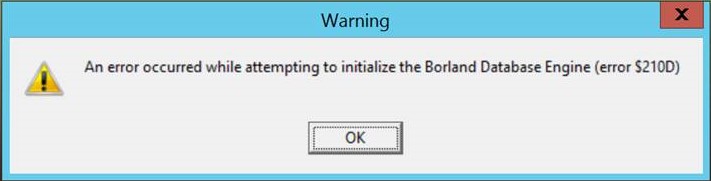
An error occurred while attempting to initialize the Borland Database Engine (error $210D)

Borland Database Engine Error
The error may happen anytime during usage of the app. The error is most likely caused by insufficient shared memory that is available for the database engine usage. Thus, the resolution for the error is by increasing the shared memory available for the BDE.
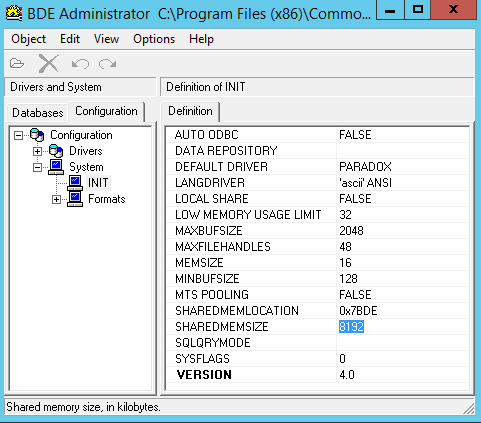
  1. Open Control Panel.
  2. Search for and open BDE Administrator.
  3. Expand Configuration.
  4. Expand System.
  5. Open the INIT definition.
  6. Modify and enter the value of SHAREDMEMLOCATION and SHAREDMEMSIZE according to the amount of physical memory (RAM) the computer has, based on table below.
    Physical Memory (RAM) SizeSHAREDMEMLOCATIONSHAREDMEMSIZE
    2 GB0x2BDE2048
    4 GB0x5BDE4096
    8 GB0x7BDE8192
    BDE Administrator
  7. The changes are saved automatically. Restart the computer when done for the changes to take effect.

2019年5月17日 星期五

[Windows 修正檔] Windows XP, 7, Server 2003 重大更新,預防 WannaCry 類型的病毒


相當罕見的,微軟推出了重大修正,用來預防 WannaCry 類型的病毒

支援的系統有:

  • Windows XP
  • Windows XP 64-Bit Edition
  • Windows XP Embedded
  • Windows Server 2003
  • Windows Server 2003, Datacenter Edition

更新包編號為 KB4500331
 官方下載點 


2017年9月17日 星期日

Outlook 開啟只能進入安全模式

1. 先將 工具->資料夾選項->檢視->顯示所有檔案資料夾
2. 到 C:\Documents and Settings\使用者名稱\Application Data\Microsoft\Outlook下,删除outcmd